Desk audit, 15 November 2026
Whisk Review (2026): Great Recipe Box, Blind to Reels
Whisk is Samsung Food now. We checked pricing, store ratings and every documented import route, with one question: can it turn a cooking video into a recipe?
Summary
This whisk review audits Samsung Food, the app Whisk became. It is a strong free recipe box and meal planner: 4.8 stars on the App Store, 4.4 on Google Play, Food+ at $59.99 a year. But its four documented import routes (link, Chrome extension, share sheet, photo scan) do not read cooking videos. Good for saving blog recipes and planning a week, a poor fit if your recipes live inside TikToks and Reels.
Whisk, now sold as Samsung Food, scores 7/10 for people who save recipes from blogs and plan a week of dinners. The app is free at its core, with Food+ at $59.99 a year, and holds 4.8 stars on the App Store. For video-first cooks it falls short: none of its 4 documented import routes reads a TikTok or a Reel.
- Recipe saving (websites)
- 8/10
- Video recipe import
- 3/10
- Meal planning
- 8.5/10
- Free tier value
- 8/10
- Pricing clarity
- 6.5/10
- Free core app covers saving, planning and shopping lists
- 180,000+ recipes and communities to browse for ideas
- Strong store ratings: 4.8 App Store, 4.4 Google Play
- No documented way to extract a recipe from a TikTok or Reel
- Instructions often link out to the creator's site, so link rot can strand you
- Seven Food+ features are mobile-only, and you can only subscribe on a phone
Free core app, Food+ 7-day trial
How we checked it
- Version tested
- App Store version 5.56.0, Samsung Food web pages, Food+ help center
- Test period
- 2026-11-14 → 2026-11-15
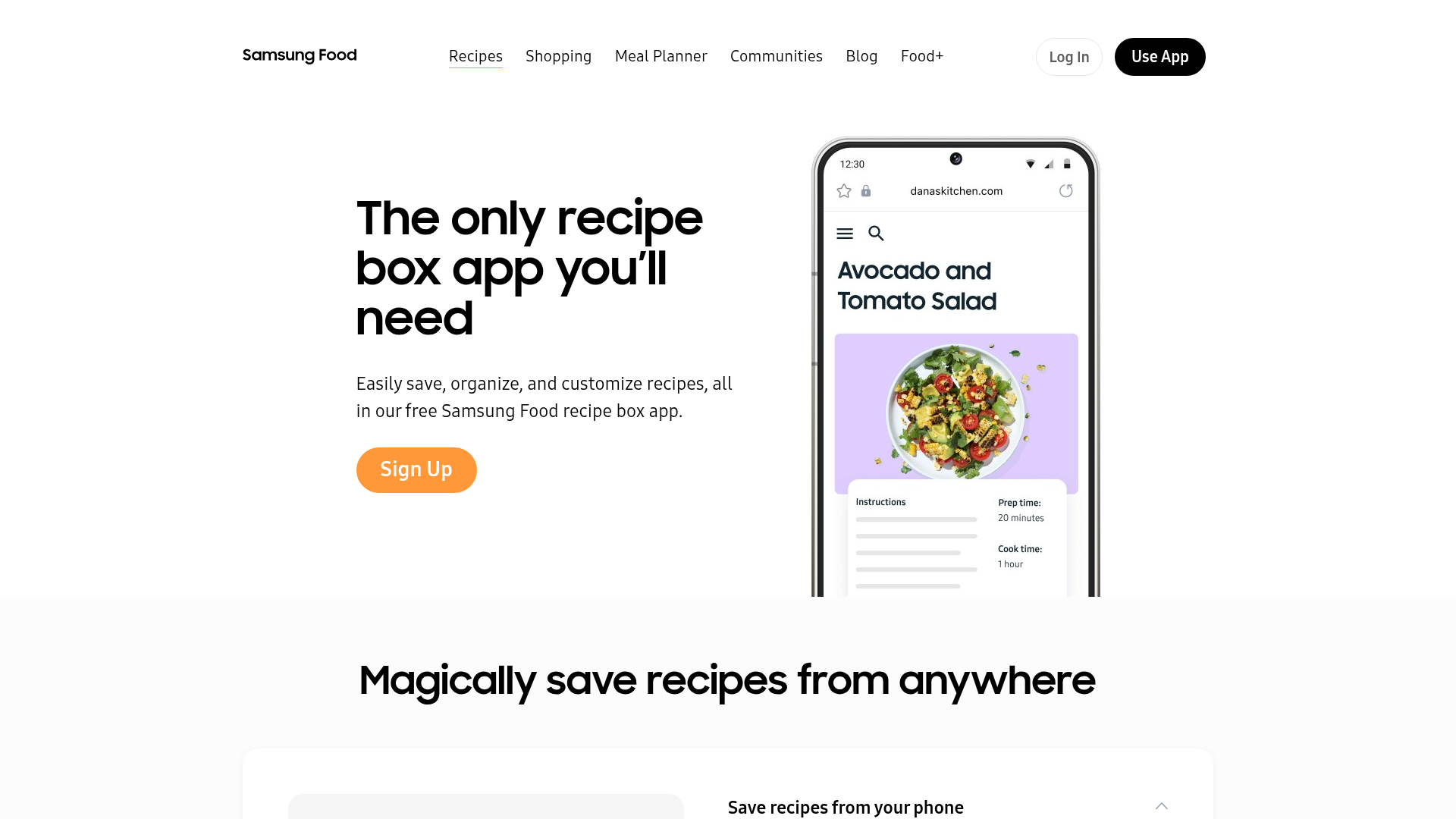
This is a desk audit, not a month of daily cooking. On 14 and 15 November 2026 we read the Samsung Food homepage, the Food+ plan page, the recipe box and meal planner pages, and the help-center articles on saving recipes and subscriptions. We read the App Store and Google Play listings for ratings and counts, and cross-read a Plan to Eat review, a CookBook comparison, several Reddit threads and store reviews. We did not subscribe to Food+ and we did not run our own videos through the mobile app, so anything about daily feel comes from other people's reports and is labelled that way. The four screenshots are first-party captures of Samsung's own pages, taken on 15 November 2026.
Should you use Whisk (Samsung Food)?
YES if you...
- You save recipes from food blogs and recipe sites
- You plan a week of dinners and want one shared shopping list
- You want a free app and may try Food+ for the AI features
- You use a Samsung phone, where Food+ can come bundled
NO if you...
- Your recipes live in TikToks, Reels and Shorts with no written text
- You want the full instructions stored in the app, not linked out
- You want to pay once instead of subscribing
What Samsung Food costs
Prices checked on the official Food+ page on 15 November 2026. They vary by country.
Free
The core app
- Recipe saving from links, Chrome extension and share sheet
- Meal planner and shopping lists
- Browse 180,000+ recipes and join communities
- 3 recipe scans from photos
Food+ annual
Save 28% against monthly
- 7-day free trial
- Tailored 7-day meal plans
- AI recipe personalization
- Unlimited recipe scans from photos
- Nutrition goal tracking, mobile only
Food+ monthly
Same features, 7-day trial
- Cancel through the App Store or Google Play
- Billed on the phone store only
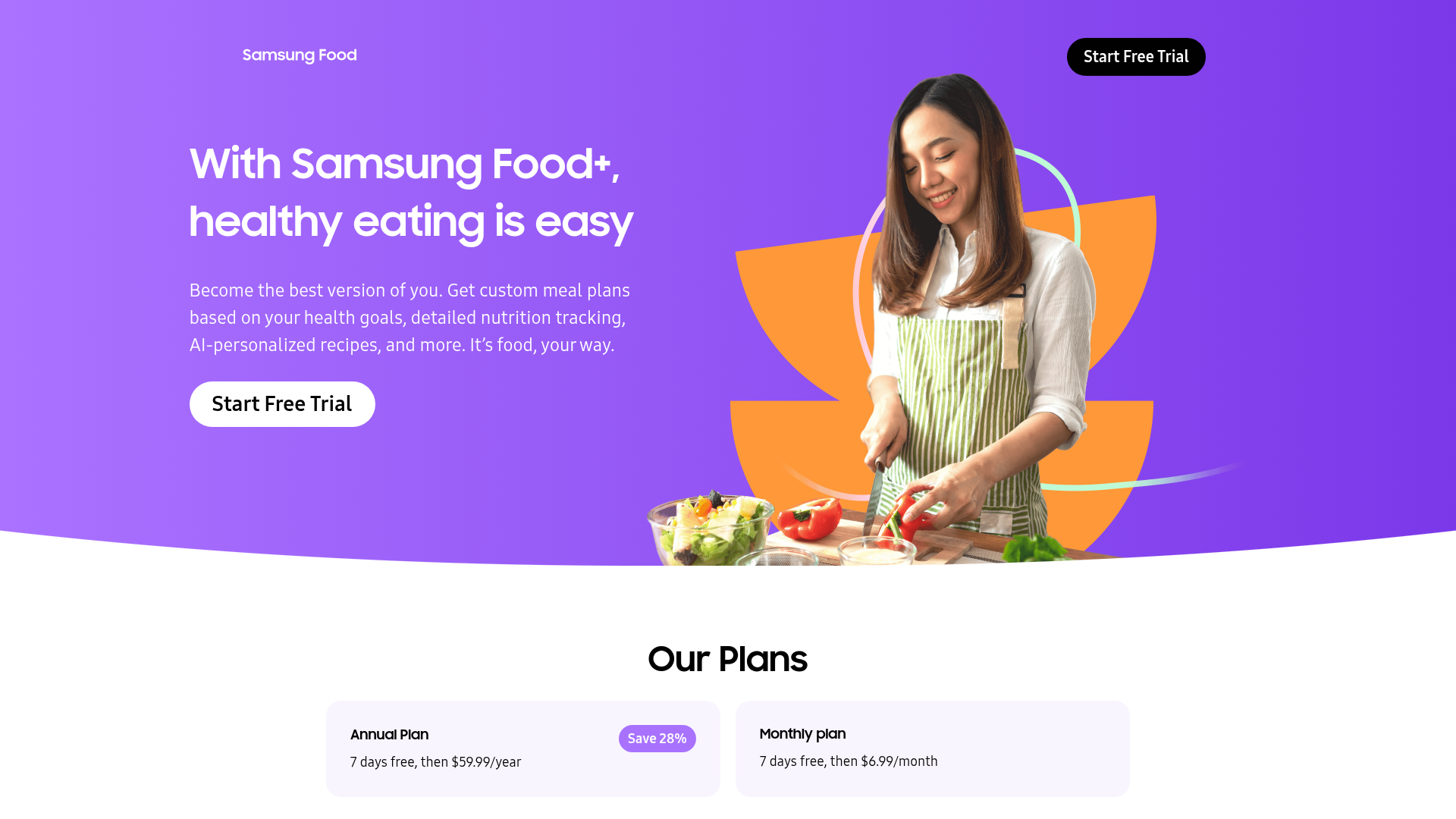
ROI breakdown: Annual Food+ works out to $5.00 a month against $6.99 monthly, so you save $23.89 a year. It only pays off if you use the AI plans weekly; the free tier already covers saving, planning and shopping.
Hidden costs & gotchas
- You can only subscribe from a mobile device, not the web app
- Photo scanning stops after 3 free scans
- The seven headline Food+ features are labelled exclusive to the mobile app
- Price changes by country because stores convert automatically
Saving from anywhere means anywhere with a page
Samsung's recipe box page promises you can save recipes from anywhere. In practice the help center lists link paste, a Chrome extension, the phone share sheet and photo scanning. All four assume there is a recipe page or a printed recipe to read.
- Save by link: 1 paste, then Save
- Chrome extension for desktop browsing
- Share sheet on iOS and Android
- Photo scan: 3 free, unlimited with Food+
The planner is the best part
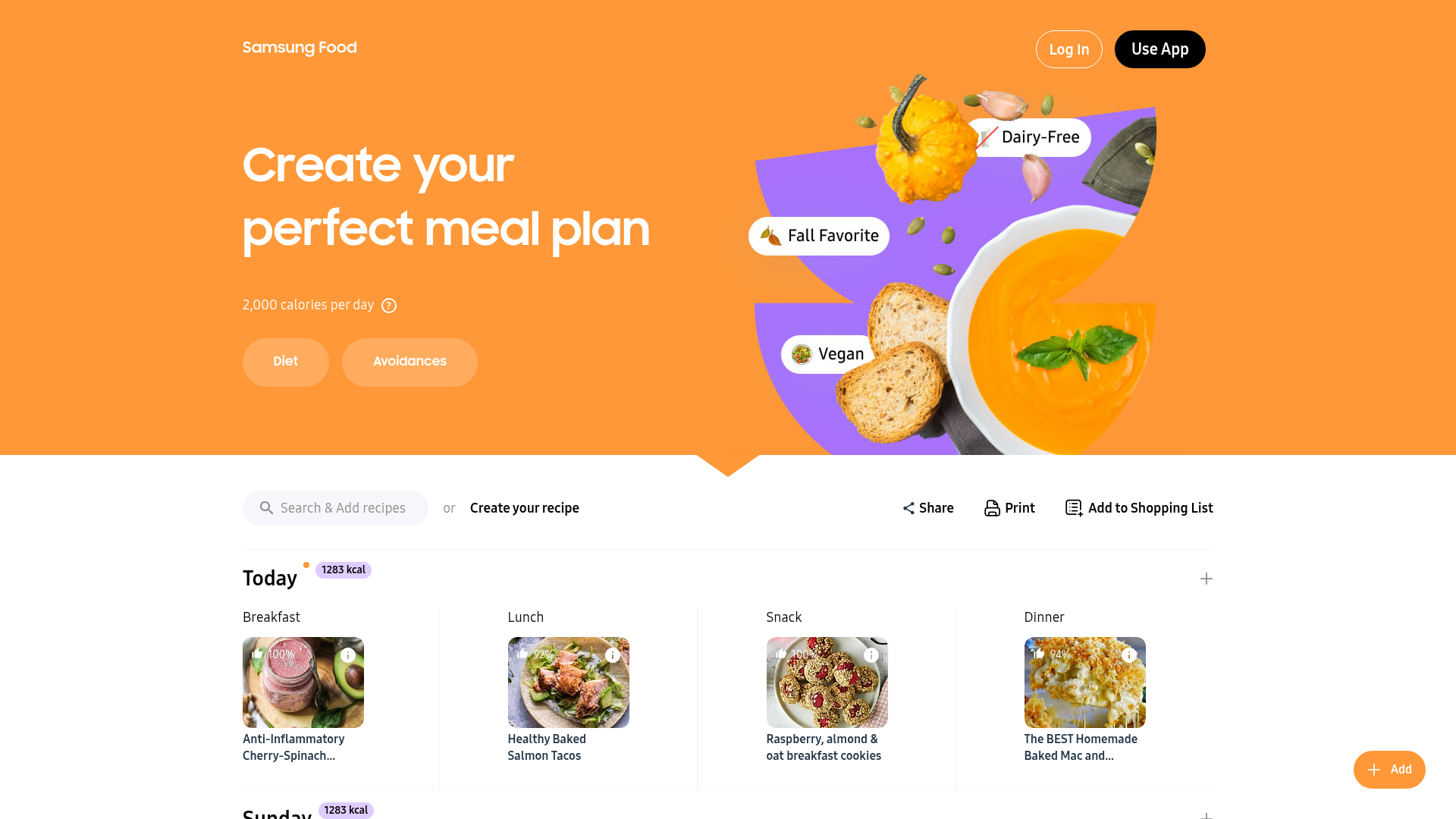
The planner page shows a week with calories per day, a search box, share and print buttons and an add-to-shopping-list action. For a household that eats from blogs, this is the reason to install it.
- Drag saved recipes into a weekly plan
- One tap to build a shopping list
- Calorie totals per day on the sample plan
What we measured
Every figure below was read from a public page on 14 or 15 November 2026.
- Apple App Store rating
- 4.8 out of 5 6.5K ratings, US listing, version 5.56.0
- Google Play rating
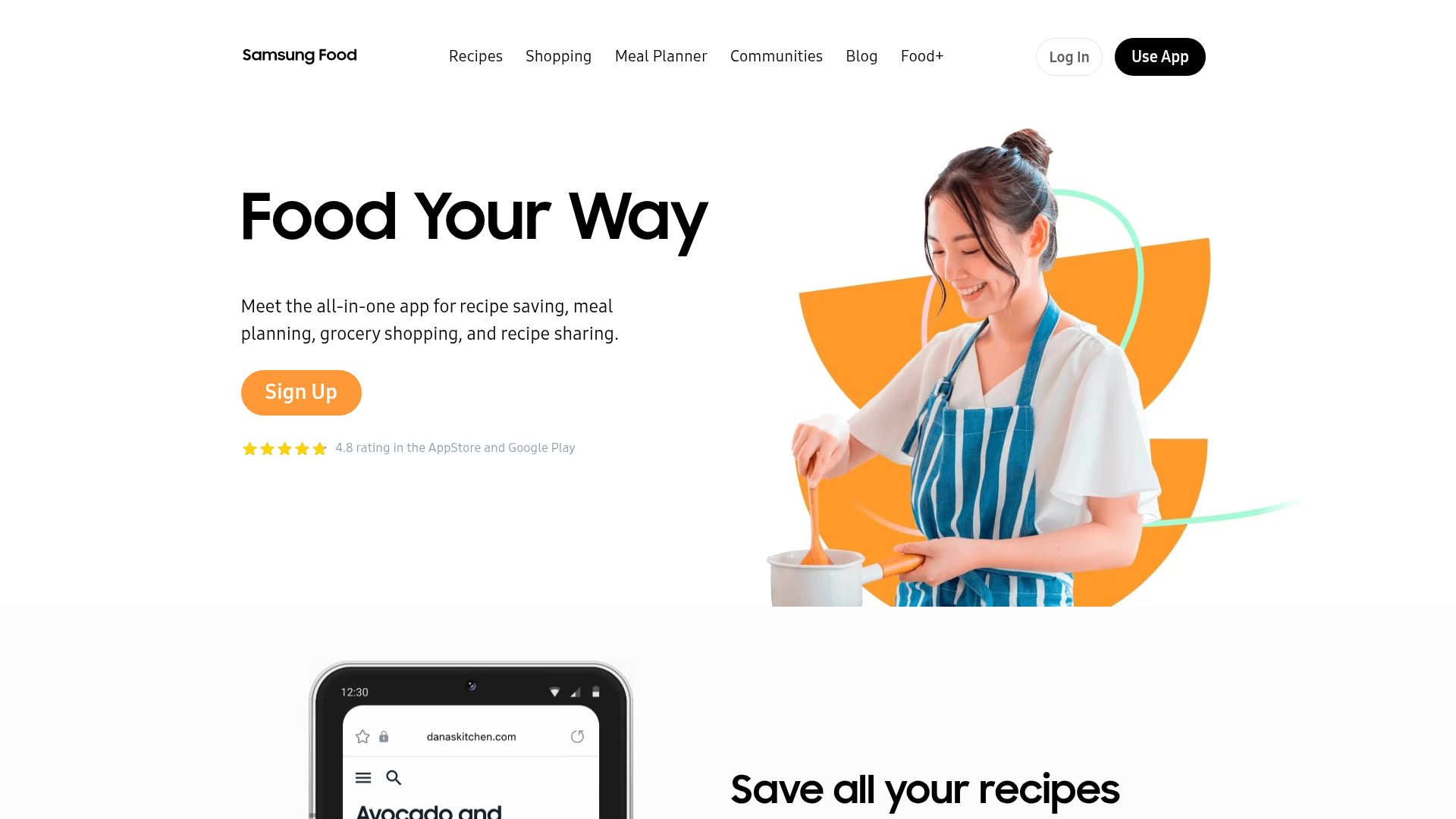
- 4.4 out of 5 23.2K reviews, 1M+ downloads. The homepage claims 4.8 on both stores
- Food+ annual price
- $59.99 per year $5.00 a month, 28% under the $6.99 monthly plan
- Documented import routes
- 4 Link, Chrome extension, share sheet, photo scan. Zero read a video
- Free photo scans
- 3 Unlimited with Food+
- Mobile-only Food+ features
- 7 All seven listed features carry an exclusive-to-mobile label
Does the Food+ plan page show the real price and trial?
What does the homepage promise about ratings?
Can we find a documented route to import a recipe from a TikTok or Reel?
Pros & cons
Pros
- The free tier does the core job Saving, planning and shopping lists cost nothing. Food+ is optional, and a 7-day trial lets you judge the AI plans before paying.
- Planner and shopping list are polished App Store reviewers repeatedly praise the shared shopping list and automatic serving scaling. The planner page shows calories per day out of the box.
- Big recipe library and communities Samsung lists 180,000+ recipes to browse, which helps when you do not yet know what to cook.
Cons
- No documented video import None of the four save routes reads a TikTok, Reel or Short. A creator has to publish the full recipe on Samsung Food for you to follow it.
- Instructions link out to the original site Samsung says it does not import instructions, to honor the recipe creator. Reviewers report dead links, paywalled sources and recipes left with ingredients only.
- Rebrand and paywall fatigue Reddit threads from the Samsung takeover and store reviews describe an app that got busier, and some features, like photo scans and cook mode, now sit behind Food+.
- Mobile-only paid features All seven features listed on the Food+ page carry an exclusive-to-mobile label, and you cannot subscribe from a browser.
Final verdict
Whisk, now Samsung Food, is a good recipe box wearing a bigger, busier costume. If your recipes come from blogs and you cook from a weekly plan, it is a free, well-rated way to keep them in one place, and Food+ at $59.99 a year is optional rather than forced. We would try the free tier first and the 7-day trial only if you want AI meal plans.
The catch is the one this site cares about. We found no documented route that reads a cooking video, and the app sends you back to the creator's page for instructions. If you save recipes from TikTok and Reels, you will still be pausing the video, typing quantities and hoping the caption holds the real recipe. A tool built for video input will do that job better.
Score: 7 out of 10. It is 8.5 for planning and 3 for video import, and the average hides how different those two experiences are.
- Recipe saving (websites) 8/10 Link, extension, share sheet
- Video recipe import 3/10 No documented route
- Meal planning 8.5/10 The standout feature
- Free tier value 8/10 Core app is free
- Pricing clarity 6.5/10 Mobile-only upsell
Whisk questions people ask
Is Whisk the same as Samsung Food?
Is Samsung Food free?
Can Samsung Food import recipes from TikTok or Instagram?
What does Food+ add?
What are the store ratings?
Does it save the full instructions?
Can I get Food+ for free?
Update log
- Initial publication: desk audit of pricing, store ratings and import routes.